Tuesday, August 4, 2009

Oracle 10g: New Instance.

After creating a new instance into our machine. Below basic items must be done before data can be stored.

1. Create Tablespace


  • create tablespace [tablespacename] datafile [path] size [size];

2. Create User


  • create user [username]
    identified by [password]
    default tablespace [tablespace]
    temporary tablespace temp;


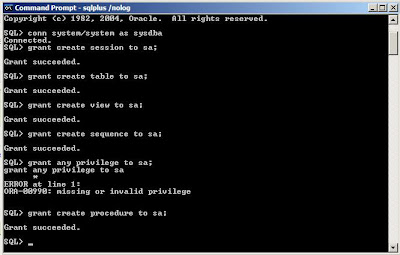
3. Granting Rights


  • grant create session to [user];

  • grant create table to [user];

  • grant create view to [user];

  • grant create sequence to [user];

  • grant create procedure to [user];


4. Grant All Privileges..[make sure to connect as the sysdba of the instance]:

  • conn system/system as sysdba;
  • grant all privileges to sa;

Monday, August 3, 2009

Oracle 10g: Database Connection via SQL*PLUS

1. Open a command prompt.
2. To open SQL*PLUS console..do this..:
  • set oracle_sid=[instance/database]
  • sqlplus /nolog

3. Then...[I just created my table ..therefore I am logging in as sysdba]:
  • conn [username]/[password] as sysdba
4. There you go..You are connected!

MOSS 2007: Installing Templates

Where to start? I started by downloading a MOSS template called SiteAdminTemplate from this site.

A. Uploading templates to your server.

...unzip downloaded EXE file to any folder...

...2. u'll see a lot of *.stp files and *.wsp files

3. goto Start > All Programs > Microsoft Office Server >
Sharepoint 3.0 Central Administration...
goto Site Actions > Site Settings..

..4. click Site Templates from Galleries..

..5. Click Upload > Upload Multiple Documents..

..6. Select All downloaded files [stp and wsp]..

..7. Progress bar will pop up...

..8. All selected files will be appeared as Site Template Gallery..


B. Create New Project By Using Templates

..1. goto Site Actions > Site Settings..

..2. goto Sites and Workspaces under Site Administration..

..3. Fill up New Site information...
After files being uploaded a new tab called 'Custom' will be appeared...
..Choose any template that you reckon..

...4. Automatically files being created...

ok guys..that will be the 'GUI' way of doing it..I shall test out the command prompt installation any sooner than today....

Sunday, August 2, 2009

I went speechless

Damn...as I arrived at the training center..plus felt so DBA at that time...sweating..but yet excited...someone reached me..saying...- 'I'm so sorry..but your name is not in the list..you are not being registered'...WHAT??????

waited for nearly 45 minutes...sweating...tensed...I just went speechlessss...yup there we go again...my excitement flushed into the toilet!....

called the HR manager..and he said..the company is pulling back the budget for the oracle training..and they are planning to send me for the .NET certification...oh god..oh dear...not again..my body shivered..this happened last year..and its happening again...

started googling...i kept on thinking...and searching...don't we have good market for oracle here in Malaysia?...OR...am i wanting it so much...that makes it real hard to get?

Today Will Be IT!

...today will be my first day of attending the Oracle 11g administration class..Mind setting of the day: I AM A SPONGE....Talked to some experts on this matter...no matter how many courses we attend...the experiences and the skills are so needed in this field rather than a piece of paper..

Okay..got if chief!

Saturday, July 25, 2009

Today I Learn MOSS 2007

..Next..I present you...the 'Search Page'...Built in less than 15 minutes!...

Wednesday, June 24, 2009

Oracle 10g: Flush Data To External Table - Using For Loops & Calling Stored Procedures

I'm using external table as a passage to load data from a flat file ''postcode.CSV' to respective table - "GBL_POSTCODE_DTL ".

Script:

/*
*
* Pump data to table:
*

*
*
* @Migration POSTCODEDIR
* @author Nur Fiza Suhati
* @version 1.0
*
*/
/*
1. Directory to database
*/
CREATE OR REPLACE DIRECTORY POSTCODEDIR AS 'C:\oracle\product\10.1.0\oradata\myep';
DROP TABLE POSTCODE_EXT;
create table POSTCODE_EXT (
ADDRESS varchar2(100),
IDTABLE VARCHAR2(1000),
POSTCODE varchar2(100),
POSTOFFICE varchar2(100),
STATE varchar2(100))
Organization external
(type oracle_loader
default directory POSTCODEDIR
access parameters (records delimited by newline
fields terminated by '')
location ('postcode.csv'))
reject limit 100000;

TRUNCATE TABLE GBL_POSTCODE_DTL;
INSERT INTO GBL_POSTCODE_DTL (ADDRESS,POSTCODE,POSTOFFICE,STATE,ID)
(
SELECT postcode_ext.address,postcode_ext.postcode,postcode_ext.postoffice,
CASE WHEN postcode_ext.state = 'JOHOR' THEN 2
WHEN postcode_ext.state = 'KEDAH' THEN 3
WHEN postcode_ext.state = 'KELANTAN' THEN 4
WHEN postcode_ext.state = 'MELAKA' THEN 5
WHEN postcode_ext.state = 'NEGERI SEMBILAN' THEN 6
WHEN postcode_ext.state = 'PAHANG' THEN 7
WHEN postcode_ext.state = 'PERAK' THEN 9
WHEN postcode_ext.state = 'PERLIS' THEN 10
WHEN postcode_ext.state = 'PULAU PINANG' THEN 8
WHEN postcode_ext.state = 'SABAH' THEN 13
WHEN postcode_ext.state = 'SARAWAK' THEN 14
WHEN postcode_ext.state = 'SELANGOR' THEN 11
WHEN postcode_ext.state = 'TERENGGANU' THEN 12
WHEN postcode_ext.state = 'WILAYAH PERSEKUTUAN' THEN 15
ELSE 19
END AS "state",TO_NUMBER(postcode_ext.IDTABLE)
FROM postcode_ext postcode_ext
);

set serveroutput on
declare
CITYID_ INTEGER;
begin

FOR r IN (SELECT distinct(gbl_postcode_dtl.POSTCODE), gbl_postcode_dtl.POSTOFFICE, gbl_postcode_dtl.STATE FROM gbl_postcode_dtl gbl_postcode_dtl)

LOOP

gbl_address_pckg.SP_ADDDTLCITY(CITYID_,r.STATE,r.POSTCODE,r.POSTOFFICE);
dbms_output.put_line('postcode: ' r.POSTCODE );

END LOOP;

end;

Oracle 10g: Flush Data To External Table - Using Insert Statement

I'm using external table as a passage to load data from a flat file ''scname.CSV' to respective table - "GBL_SPECIES_MST".

Script:

/*
*
* Pump data to table:
*

*
*
* @Migration SPECIESDIR
* @author Nur Fiza Suhati
* @version 1.0
*
*/
/*
1. Directory to database
*/
CREATE OR REPLACE DIRECTORY SPECIESDIR AS 'C:\oracle\product\10.1.0\oradata\myep';
DROP TABLE SPECIES_EXT;
create table SPECIES_EXT (
ID varchar2(100),SCIENTIFICNAME VARCHAR2(100))
Organization external
(type oracle_loader
default directory SPECIESDIR
access parameters (records delimited by newline
fields terminated by '')
location ('scname.csv'))
reject limit 100000;

TRUNCATE TABLE GBL_SPECIES_MST;
INSERT INTO GBL_SPECIES_MST (SPECIESID,SCIENTIFICNAME)
(
SELECT SPECIES_EXT.ID,SPECIES_EXT.SCIENTIFICNAME
FROM SPECIES_EXT SPECIES_EXT
)

;